Step 1 : CLOSE THE FILES OR FOLDER, IF OPEN. To password protect folders in VISTA, you should first close them. This is particularly true if you are setting password protection to an executable file (.exe) or a folder that contains an executable file (also called a program). If you are unsure of an executable file's status, press control+alt+delete to view all programs running.
Step 2 : LOCATE THE FILES OR FOLDERS YOU WISH TO PASSWORD PROTECT. Do not click to open the file or folder. You can find files or folders by using the "COMPUTER" tool in your Vista Start Menu.
Step 3 : RIGHT CLICK ON THE FILE OR FOLDER'S ICON. To access the option to password protect folders in VISTA, right click on the file or folder icon. Select "Properties", at the bottom of the resulting pop-up menu.
Step 4 : CLICK THE 'SECURITY' TAB IN POP-UP WINDOW. In the pop-up Properties menu, click the 'SECURITY' tab on the top right of the pop-up window.
Step 5 : CHANGE FOLDER PERMISSIONS. In the Security menu, you will see two white text boxes. The top box shows various users and user groups on your computer. Highlight the user group you wish to deny access to the program and click the "edit" button between the two boxes. You should now be able to add or deny access to the program for the selected user by clicking options in the bottom white text box. Edit the options for each user or user group you wish to deny access to. Click apply after editing for each user. When finished, click "OK". Next, click "OK" on the Security window to approve changes. You have locked the program down and users must now access your Vista user account by password to access the program. Once logged into your Windows Vista user account, you will now have to supply the password to access the file or folder.
Step 6 : TEST ~ To make sure you actually did lock Internet Explorer, try to open the program. Log out of your user account and log in as the user you have locked out of file or folder. If you are unable to locate the file or folder as the prohibited user, you did password protect folder in Vista.
Sunday, August 23, 2009

Monday, August 17, 2009
How to connect a new computer to wireless internet?
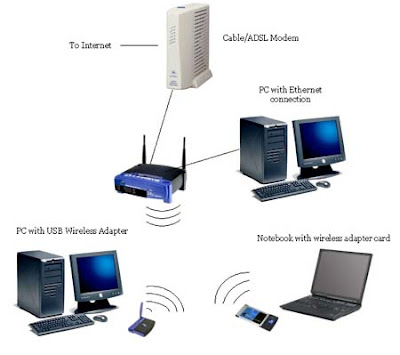
Option 1: First, you'll have to find out who your Internet Service Provider (ISP) is. I use Verizon DSL.
-Then, if the company sent you a router, you need to look on the back for a listing of the WEP, or secure connection password (If you don't have a WEP, this will be addressed further on.
-When you find the WEP, then each of your computers needs to have a Wireless Card Adapter OR a Buffalo Air-station (or similar product). This is very, very important. It is impossible to have a wireless connection without a wireless adapter.
-When you have prepared all of your computers and have the WEP memorized or written down, then continue to the next step.
-Assuming you're using Windows (Vista instructions are probably similar, but these are for XP), go to:
-Start > My Network Places > "Set up a wireless network...."
(Should be on the left side menu), and then follow the instructions.
-IF YOU DON'T HAVE A WEP, then the most common alternative password you can use is "admin" without quotes.
-IF "My Network Places" isn't listed on your start menu, then follow these instructions: Right click the start menu and select "Properties" > Click "Customize" > Advanced Tab > Make sure the "My Network Places" box is ticked/checked > Select OK > Apply > OK and then re-open the start menu and you will have the icon listed.
Monday, August 10, 2009
How to configure my D-Link Router?
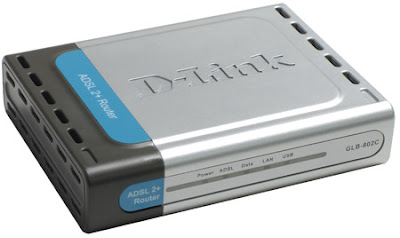
Step 1: Connect your laptop or desktop computer to the D-Link router with an Ethernet cable. Open your web browser and enter the following IP address in the web address window: 192.168.1.1. Login to the router through using the default login name admin and default password admin.
Step 2: Select the "Setup" menu at the top of the D-Link router home page and select "New Connection" on the next window. On the setup screen which then appears, select the type "Bridge" and input the number "35" into the VCI field.
Step 3: Select "Tools" and "System Commands" from the D-Link router page menu and click the "Restart" button. This will restart the D-Link router with the configurations saved.
Step 4: Open the "Control Panel" icon on your computer and select the "Network Connections" icon. On the menu screen that appears, double left click the "Create a New Connection" icon.
Step 5: On the resulting screen, select "Connect to Internet" and "Set Up My Connection Manually." Then, select the menu selection which states "Connect using a broadband connection" and the "Enter ISP Name" menu option that appears. Select the "Apply" menu option and the D-Link DSL router settings will be saved.
Wednesday, July 29, 2009
In News: iYogi Re-Defines Technical Support – BizTech2.com
Remote managed services are gaining a lot of attraction these days. Companies are looking to outsource the maintenance and monitoring of their IT infrastructure to a third party to improve efficiency and save costs. BizTech2.com caught up with Uday Challu, founding partner and CEO, iYogi, to see what the company has to offer in this space.
As far as Enterprise and SME customers are concerned, which verticals are you focusing on?
Our focus will mostly be on small companies with around five to 100 users and also firms that have multiple small branch offices like travel agencies, retail stores etc.
What kind of support services do you provide to your customers? What is the Green PC service?
iYogi provides the next generation of remote computer support services for consumers and businesses. For consumers, our live 24/7 support extends to technologies we use everyday, including hardware, software applications, devices, peripherals and networking equipment. iYogi also offers a full range of business IT solutions including managed monitoring, managed services, set-up and installation services, and incident-based services.
Green PC Service
With the current state of the global climate and increasing dependency on the computer, iYogi helps PC users reduce their carbon footprint and save money at the same time. iYogi’s Green PC service is the first in the independent computer support industry to offer customers a way to save money, conserve energy and protect the environment by optimising their PC’s efficiency. Consumers and businesses can save up to $200 per year, per desktop, in energy costs with iYogi’s Green PC application. This green application makes the computer environmentally friendly by reducing power consumption by almost 50 percent.
Our Green PC dashboard helps customise power settings and calculate power savings in kWh (kilowatt hour). The Green PC dashboard also gives a status on the reduction of CO2 and how responsible usage will benefit the environment by saving trees. A customised service that increases the energy efficiency of computers, undertakes the below-mentioned three primary initiatives:
- Computer assessment, analysing settings and PC energy use
- Customised efficiency planning geared specifically to the individual’s usage patterns
- Implementing setting changes to maximise the computer’s energy use
What are the technologies that allow you to offer 24/7 support and ensure there is no downtime at the client site?
We have invested significantly in developing a comprehensive monitoring and management tools stack. This enables us to manage and monitor all devices in the office network as well as for branch offices and mobile users. Our tools continuously monitor the customer’s network and notify our NOC (Network Operations Centre) in case of problems. Based on the set of events, tickets are automatically generated and escalated to corresponding teams. Over and above our proactive approach, the customer always has an option to call our 24X7 support line for issues that are not identified via the monitoring tools.
Please throw some light on your proprietary iMantra technology.
iMantra is a CRM system, which is tailor-made to suit the emerging business needs at iYogi. It allows for the formation of individualised customer relationships with the aim of providing personalised services to each subscriber. This tool is built on the latest java technology with a layered architecture that makes it scalable and secure. This architecture provides a seamless workflow and independent channels for various business needs: sales, support, quality and customer service. The entire system can be exposed in the form of secure APIs and Web services, which makes it a re-usable entity.
Your business model is similar to BPOs in India providing technical support to offshore customers. What unique values do you bring to this ecosystem that would help a potential client choose you over a competitor?
iYogi’s business model is different from traditional BPOs. Some key factors that differentiate iYogi include:
- Direct-to-consumer and -small business: iYogi delivers technical support services directly to consumers and small businesses and is a global technical support brand based out of India. Unlike traditional BPOs in India, iYogi does not provide any private label support and/ or work on behalf of large OEMs or software publishers.
- Optimised Processes: iYogi has developed proprietary processes for consistently delivering on a resolution rate of 87 percent, which is among the highest published benchmarks in the support industry, where averages hover in the range of 50 percent.
- Comprehensive technology platform: iYogi’s global delivery platform, iMantra, gets smarter with every customer interaction. It documents every problem, the solution and relevant hardware and software aspects, while capturing each customer’s demographic information and creating a behavioural profile. All of this information is at the fingertips of iYogi’s Global Tech Experts. This set-up combines a knowledge base with a comprehensive set of tools and technology expertise. iYogi offers a range of tools that complement its remote support services for helping customers maintain technology at peak performance levels. iYogi’s products include iYogi Smart PC Scan, iYogi Support Dock, iYogi Green PC and iYogi PC Optimisation.
How do you plan to move up the value chain in the times to come?
The growing use and penetration of the Internet and new Web-based applications has consequently opened the door to threats and vulnerabilities, which affect the system performance and ultimately lead to degrading performance. If the threats are diagnosed early on, the impact on efficiency can be minimised considerably. Currently, a user only realizes that he needs technical support once the damage has occurred and reactive methods of support are used to recover from the loss.
At iYogi, we are developing our capabilities to not only provide support when demanded, but to also monitor, pre-empt and fix threats before they can cause any damage to the computer. This will be possible only by combining technology with processes that are capable of re-defining the way technical support is delivered today.
What is your India strategy?
Technically, we are capable of servicing any geography including India. At this stage, we are looking for the right kind of partners to find access to potential customers and provide them a consolidated, 360-degree solution and services for issues relating to hardware, software, network etc. We aim to launch our India services in the coming six to eight months. Our services will offer clients a one-stop solution for all their business needs.
Wednesday, May 20, 2009
Brand New Search Engine from Microsoft in Next Week

Microsoft is ready is take on Google again. It is going to launch a brand new search engine in coming week.We can say it is a big leap from Microsoft towards web related services.
Microsoft Corp is likely to show a new version of its Internet search engine publicly for the first time next week, the Wall Street Journal said, citing people familiar with the matter.
The software giant has been testing a new version of the service internally under the name of Kumo.com and it may become part of the firm's attempt to catch up with Internet search leaders Google Inc and Yahoo Inc.
Microsoft has hired JWT, a unit of WPP Plc, to develop an advertising campaign for the product, the paper said, citing people familiar with the matter. The search engine is expected to be unveiled at the "D: All Things Digital" conference.
Avail Microsoft Windows Support if you face any kind of problem with Microsoft windows operating system.
Related News and Articles
Online Microsoft Support and Help Services
Computer help and support
Online computer support
Thursday, May 14, 2009
iYogi Acquires Clean Machine Inc.
Larry Gordon, Founder of Clean Machine appointed as President Global Channel Sales at iYogi
New York, NY, May 11th, 2009 : iYogi, a global direct to consumer and small business remote technical support provider, today announced it’s acquisition of Clean Machine Inc, a provider of remotely administered PC security and performance management services. Clean Machine will operate as a separate brand under the iYogi services umbrella along with the recently lunched Support Dock (www.supportdock.com) and its comprehensive range of 24/7 technical support services for computers, printers, MP3 players, digital camera, routers, servers and more than 100 software applications. Larry Gordon, Founder of Clean Machine is appointed as the President of Global Channel Sales for iYogi.

iYogi will integrate technology and innovation that Clean Machine Inc. has developed for delivering an enhanced service experience by proactively managing the health and security for PC's and Apple Computers. This acquisition also broadens iYogi's access to key markets through Clean Machine's existing partnerships. Larry Gordon's past experience and successful track record will accelerate iYogi's expansion through his focus on global alliances.
Commenting on the acquisition of Clean Machine Inc., Uday Challu, CEO & Co-founder of iYogi, said,
"This acquisition will help iYogi to enhance our customer experience and extend our market reach to the millions of consumers that are challenged by the increasingly complex technology environment. Clean Machine's proactive maintenance and management of PCs in home and small business environment will be our launch platform for building the next generation of managed services for consumers."
"We are delighted to have Larry spearheading partnerships and global alliances for iYogi. His incredible experience in marketing, sales and building global alliances will help forge partnerships with retailers, multiple service operators, software publishers, original equipment manufacturers (OEM) and other such companies that are at the frontlines for managing tech support issues for consumers and small businesses",added Challu.
With more than 20 years of experience, Larry Gordon has played a variety of strategic roles in marketing, sales and building alliances. Larry was the Executive Vice President at Capgemini and Kanbay. He was also VP of Global Marketing for Cognizant (Nasdaq: CTSH), a leader in global IT services and Director of Marketing for New York based Information Builders.
"I am excited to join a company that shares a common mission to Clean Machine in creating a global brand for delivering the best technical support to consumers and small businesses. We also share a common approach of utilizing highly skilled talent with leading edge tools, thereby delivering services at incredible price-points, with high margins for our partners",said Larry Gordon, the newly appointed President of Global Channel Sales at iYogi.
ABOUT IYOGI
Headquartered in Gurgaon, India with offices in New York, USA, iYogi provides personalized computer support for consumers and small businesses in United States, United Kingdom, Canada and Australia. IYogi's 24/7 phone and remote technical assistance, spans across a comprehensive range of technologies we use every day from a wide range of vendors. Utilizing its proprietary technology iMantra , and highly qualified technicians, iYogi delivers amongst the highest benchmarks for resolution and customer satisfaction. iYogi is privately held and funded by SAP Ventures, Canaan Partners, and SVB India Capital Partners. iYogi was recently awarded the Red Herring Global 100 Award, recognizing it as one of the 100 most innovative private companies driving the future of technology. For more information on iYogi and a detailed list of technologies supported, visit: www.iyogi.net.
ABOUT CLEAN MACHINE
Clean Machine Inc. is a NJ-based and incorporated company that helps consumers and small business owners easily manage and protect their computing environments safely and cost effectively. The company is has a unique, powerful and inexpensive PC concierge service. Specifically, each customer is assigned a highly-trained tech concierge who remotely examines their computer system on a scheduled and very secure basis. The PC concierge will immediately fix software-based problems and prevent new threats to the customer's computing environment including offensive pop-ups, browser redirects and slow performance, and then provides a detailed report. Clean Machine's proprietary Radar(TM) technology (Remote Access Detection Audit and Repair) allows its expert technicians to remotely resolve any problems, eliminating the need for customers to go through the frustrating process of speaking with a tech support expert, and still having to do the work themselves. In other words, the Clean Machine PC concierges do it all. For more information on Clean Machine please visit www.pccleanmachine.com.
Wednesday, March 25, 2009
Microsoft Intenet Explorer 8 : Flooded with complaints
Various Complaints with IE8
Microsoft has been flooded with complaints about its new Internet Explorer 8 and has seen early users downgrade to the previous version, reported by Information Week.
The software giant is hoping that its new browser will help stem a steady flight of surfers to rival products, most notably the open-source Firefox browser.
According to the latest figures, Firefox now controls 22 percent of the browser market compared to 67 percent for Internet Explorer, which once enjoyed more than 90 percent of the market.
According to report most of the complaints regarded printing from websites, search malfunctions, image problems, boot times and the fact that the new browser takes up 4 gigabytes of disk space.
Microsoft released Internet Explorer 8 Thursday, touting its greater speed, security and ease of use. Millions of users installed the free download and by Sunday some 2.59 percent of web surfers were using the software. Also, there are software available for speed up internet
According to report, by Monday the figure had dropped to 1.86 percent as "early adopters of IE8 are switching back to the more familiar, and - at this point - reliable Explorer 7 browser".
Avail microsoft support if you face any kind of problem with The Windows Operating System has came of the ages with Windows 7
Related News and Articles
A View at Microsoft Help and Computer Support Services
Digital Signature by Microsoft
Online computer support
MSN, Windows Live - A popular service from Microsoft
Microsoft has been flooded with complaints about its new Internet Explorer 8 and has seen early users downgrade to the previous version, reported by Information Week.
The software giant is hoping that its new browser will help stem a steady flight of surfers to rival products, most notably the open-source Firefox browser.
According to the latest figures, Firefox now controls 22 percent of the browser market compared to 67 percent for Internet Explorer, which once enjoyed more than 90 percent of the market.
According to report most of the complaints regarded printing from websites, search malfunctions, image problems, boot times and the fact that the new browser takes up 4 gigabytes of disk space.
Microsoft released Internet Explorer 8 Thursday, touting its greater speed, security and ease of use. Millions of users installed the free download and by Sunday some 2.59 percent of web surfers were using the software. Also, there are software available for speed up internet
According to report, by Monday the figure had dropped to 1.86 percent as "early adopters of IE8 are switching back to the more familiar, and - at this point - reliable Explorer 7 browser".
Avail microsoft support if you face any kind of problem with The Windows Operating System has came of the ages with Windows 7
Related News and Articles
A View at Microsoft Help and Computer Support Services
Digital Signature by Microsoft
Online computer support
MSN, Windows Live - A popular service from Microsoft
Subscribe to:
Posts (Atom)